A content delivery network keeps copies of your images, CSS and JavaScript on servers near your visitors, so each request stops making the full round trip to your host. The further away your audience, the bigger the gain: Manchester to Santiago is about 193ms per round trip, and a page makes dozens of requests. For a UK-only audience the gain is much smaller.
On this page ▾
The internet moves fast, but the physical distance between your server and your visitors still matters. Data travelling from a UK server to Santiago, Chile takes around 193ms per round trip. For website owners, that might sound trivial until you consider that a browser loading a single page makes dozens of separate requests for HTML, CSS, JavaScript, images and fonts – those milliseconds stack up quickly. Understanding how much a CDN can speed up your website starts with understanding the gap between your web host and your visitors.
The ping test below shows real-world latency from Manchester to several locations around the world. It is a useful illustration of why geography affects website performance, even on a fast connection.
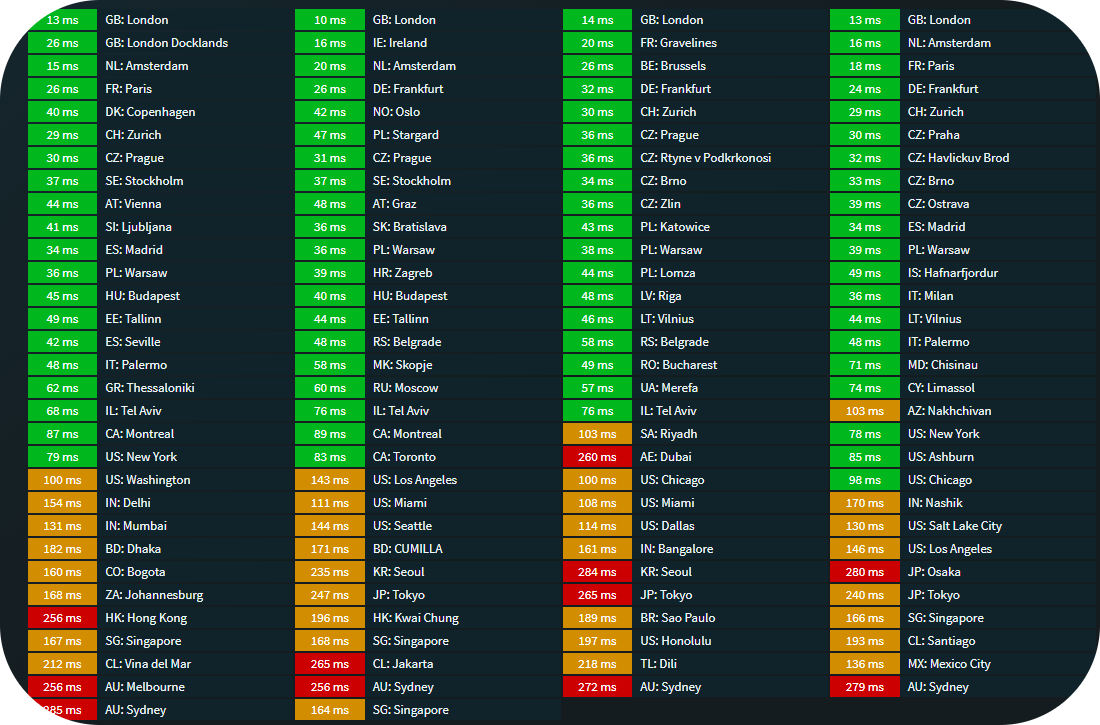
Take the Santiago figure as an example. On a vanilla Apache server with no caching, each asset request carries that 193ms penalty. Ten JavaScript files alone would add nearly two seconds. Twenty images would add almost four. Browsers do load many of these in parallel, so real-world figures are better than that, but the principle holds. Distance costs time, and time costs visitors.
What a CDN actually does
A content delivery network CDN is a geographically distributed network of servers that cache your site’s static assets and serve them from whichever location is closest to the visitor. Instead of every request travelling back to your origin server, the CDN handles it from a nearby node. Some providers also use the term content distribution network, though both names refer to the same architecture.
The practical benefits beyond speed include:
- Reduced latency. Visitors load assets from a server close to them rather than your hosting location.
- Better resilience. Most CDN providers include failover protection, so a traffic spike is less likely to take your site down. Content availability is maintained and visitors receive uninterrupted service even when traffic surges.
- Improved website security. Because visitors no longer connect directly to your origin server, it is harder to target with DDoS attacks and bot traffic. The CDN absorbs and filters network traffic before it reaches your infrastructure.
Some providers also layer on analytics, image compression and malware protection. These vary by tier and provider, so it is worth checking what is included before committing to one.
How does a CDN work?
To understand how CDN work in practice, it helps to trace a single user request from start to finish. A visitor opens their browser and requests a web page on your site. Rather than that request going directly to your origin web server, it is routed to the nearest CDN edge servers. CDN edge servers and caching servers are deployed across data centers at multiple geographical locations around the world, placing website content and website resources as close as possible to nearby users. This geographically distributed network is what closes the distance gap between your hosting location and your visitors.
Each client request is handled by the nearby CDN server rather than your origin. The nearby CDN server checks whether it already holds a copy of the requested content. If it does, the cached content is returned directly to the user’s device without touching your origin server at all. If it does not, the CDN fetches the website content from your web host, stores a copy in its local cache, and delivers it to the visitor. Subsequent user requests from other visitors in the same region are served from that cached copy, so the origin server is only contacted once per region per cache period rather than once per visitor.
This architecture helps accelerate content delivery because the physical path between the CDN’s content servers and the visitor is far shorter than the path between your origin and the visitor. Delivering content from multiple locations simultaneously means the CDN can serve more users at once without degrading server response times. Load balancing across the CDN network keeps individual servers from becoming bottlenecks, and the core network links between CDN data centers are typically faster than the general internet, which reduces latency further.
More advanced CDN configurations include edge computing capabilities, where lightweight application logic runs at the network edge rather than the origin. This allows personalisation, security rules and A/B testing to run closer to the visitor, reducing unnecessary redirects back to the origin for dynamic decisions. Most websites do not need this, but it is available on paid CDN tiers.
What content a CDN delivers
CDN services are most effective for static content: files that do not change between requests. This includes images, CSS stylesheets, JavaScript files, fonts and other web content that stays the same regardless of who is viewing a web page. These assets are cached on CDN servers and delivered directly to the visitor without any processing by your web host.
Dynamic content, such as personalised pages, account dashboards or search results, cannot normally be cached in the same way because the response depends on who is asking and when. CDNs still help with dynamic content by reducing network congestion and maintaining fast routing between the visitor and your origin server, but the performance gain is smaller than for static assets.
For media-heavy sites, the difference is most noticeable. Large file downloads, streaming media and high-resolution images all consume significant bandwidth and generate many separate requests. Serving these media files from CDN edge servers close to the visitor reduces transfer times and offloads bandwidth usage from your hosting account. Image optimization is included in some CDN tiers, automatically compressing and resizing images to match the user’s device, which reduces file sizes and speeds up page load further. Some CDN services also minify CSS and JavaScript, stripping unnecessary code to reduce file sizes before delivery. Software downloads and other large internet content benefit from the same principle: distributing files across multiple locations means nearby users always have a fast path to the content.
CDN impact on web traffic, performance and costs
How much does a CDN speed up website performance in practice? The answer depends on where your visitors are. For a local UK audience, the gain is modest because the distance is already short. For visitors in other continents, the difference can be several seconds per page load, which has a direct effect on whether they stay or leave. Page load times are a factor in search engine rankings, and website speed has a measurable impact on conversion rates on transactional pages. A CDN that can boost performance for distant visitors improves both customer satisfaction and the likelihood of a completed transaction. Visitors leaving before a page loads are more common on mobile devices with slower connections, where the distance penalty is compounded by limited bandwidth.
For a site serving a global audience, the performance gap between visitors close to your server and those far away can be significant. A CDN narrows that gap by reducing the distance web content has to travel for distant visitors. Performance metrics like Time to First Byte (TTFB) and Largest Contentful Paint (LCP) both improve when static assets are served from nearby CDN edge servers rather than from a single origin web server. These are the same metrics Google uses in its Core Web Vitals assessment, which feeds into search rankings. As more users visit your site from different regions, the consistency of experience across those regions becomes more important, and a CDN is the most practical way to deliver it.
Bandwidth costs are another consideration for high-traffic sites. Serving large volumes of web traffic from your origin hosting consumes your bandwidth usage allocation and may incur overage charges depending on your plan. CDN services offload a large proportion of that traffic to the CDN’s own infrastructure, which can reduce bandwidth consumption significantly. Using a CDN to reduce bandwidth costs is one of the more practical financial benefits for high-traffic publishers. Reducing bandwidth consumption lowers operational costs for sites serving video, software downloads or large media files. On a small local site, the savings are negligible, but for content providers with a large audience the reduction in bandwidth usage has a real financial effect.
Choosing a CDN provider
The right provider depends on your site’s requirements, your budget and how much configuration you want to manage. There are well-known global platforms and smaller, more focused options. The comparison below gives a sense of what the market looks like.
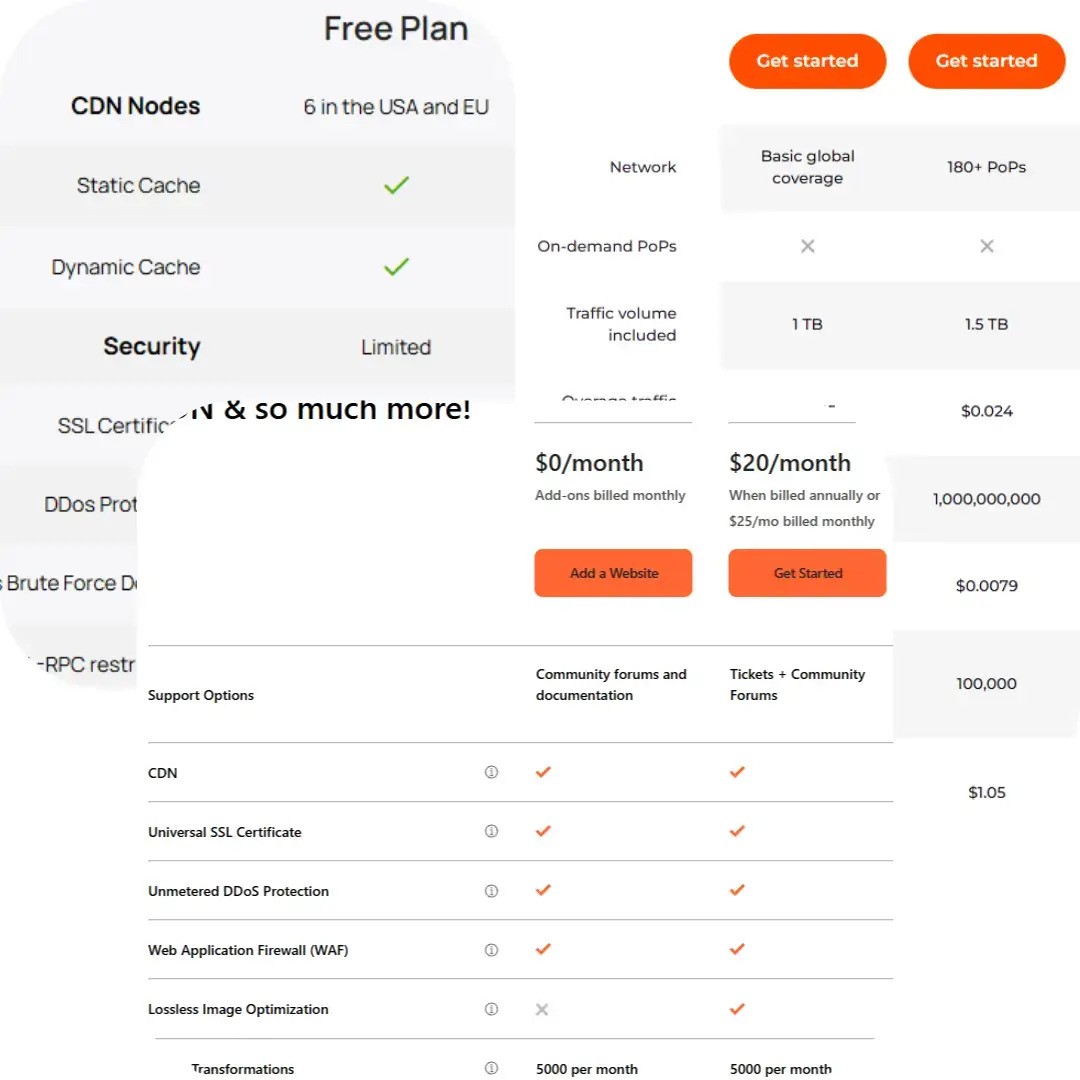
For most sites, Cloudflare is the natural starting point. It operates nearly 300 data centres worldwide and includes DDoS protection, a Web Application Firewall, SSL/TLS encryption and DNS management on its free tier. That is a substantial feature set at no cost, which is why it remains one of the most widely used CDN services available.
The free tier exists because Cloudflare is betting that as your site grows, you will want paid features. That is a reasonable trade-off. You get genuine performance and security benefits from day one, and you can upgrade if your needs change.
One thing to watch with AccelerateWP
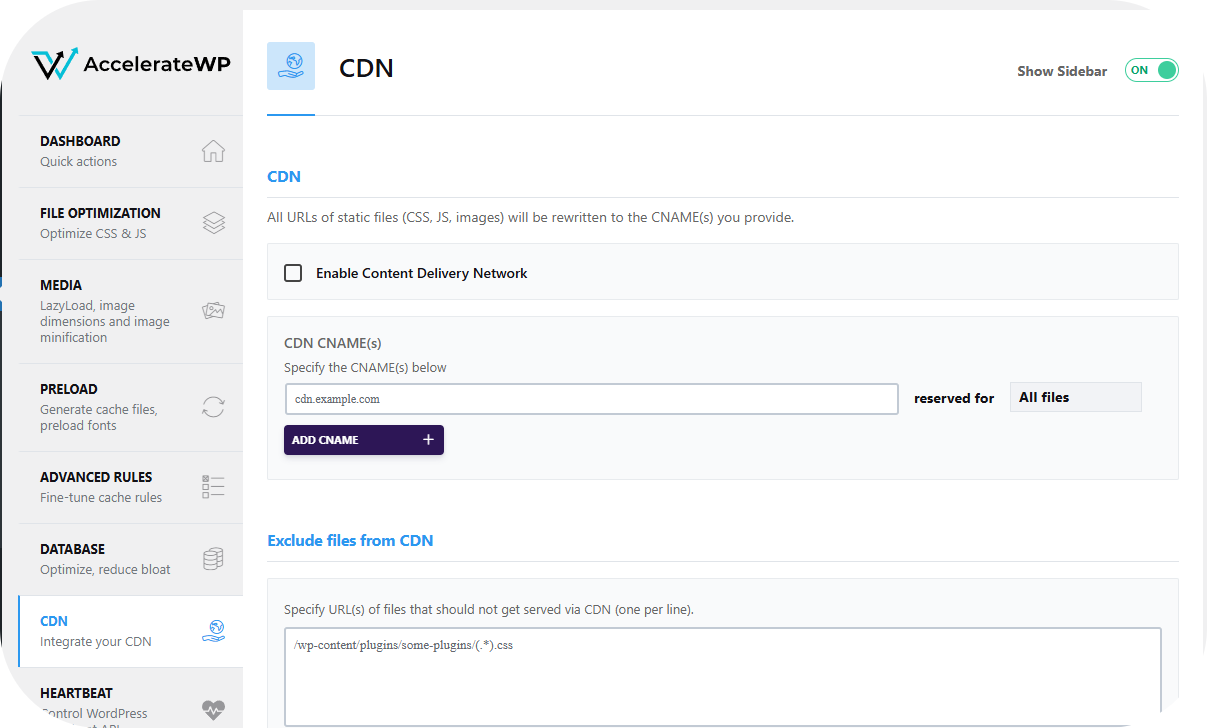
If you are on managed WordPress hosting and using the AccelerateWP plugin, you will see a CDN option in the settings. If you have already set up Cloudflare, disable the AccelerateWP CDN feature. Cloudflare operates at the domain level and covers everything beneath it. Running a second CDN layer alongside it creates conflicts rather than compounding the benefits.
Does your site actually need a CDN?
Honestly, many sites do not. For a small site with a local audience, the performance gains from a CDN alone are often negligible. That said, given that Cloudflare’s free tier includes security and caching features on top of the delivery network, there is rarely a strong reason not to use it. The question is less “should I use a CDN?” and more “what does my site actually need?”
These three scenarios cover most situations:
- International or multi-region sites
- E-commerce stores that ship globally, media sites with international readership, or any business serving customers across borders. A CDN ensures visitors in different regions get comparable load times. Without one, users far from your web host will notice the difference, and on a transactional site, that affects conversions and customer satisfaction.
- High-traffic domestic sites
- Even without an international audience, a high-traffic site benefits from the caching and resilience a CDN provides. Offloading web traffic from your origin server reduces the risk of slowdowns during traffic spikes. Web applications that handle a lot of simultaneous users benefit particularly from the load distribution a CDN provides. Check what features are included on any free tier before assuming they match what you need.
- Small or local sites
- A restaurant, a local tradesperson, a community group. If your audience is concentrated in one area, a well-configured hosting setup and a fast, lean site will serve you better than adding CDN complexity. Hosting with a provider based near your audience achieves much the same result.
For most sites, Cloudflare’s free tier is worth setting up. It takes around 20 minutes to configure, adds a meaningful security layer and costs nothing. If your site is small and local, it is not urgent, but it is unlikely to hurt.
If you want to go further with WordPress performance, the WordPress caching guide covers the other half of the speed equation.
Speed is only one part of a well-performing site. If you are looking at the hosting side of the equation, our WordPress hosting is built with performance in mind, and pairs well with a CDN setup like the one described here.
If you have questions about configuring Cloudflare with your hosting account, the Cloudflare DNS migration guide in our knowledge base walks through the process. You are also welcome to get in touch if you would prefer to talk it through.


