Phishing is an attempt to convince you that a message came from someone you trust, so that you hand over a password or payment details. Most of it is sent in bulk, and the tells are the sender address, the URL behind the link and any pressure to act quickly. Targeted versions aimed at one business are called spear phishing.
On this page ▾
So what is phishing? Phishing is one of the most common methods cybercriminals use to steal passwords, personal and financial information and personal data, often leading to fraud or identity theft. Most phishing attacks are untargeted, sent in bulk to millions of addresses as part of large phishing campaigns in the hope that a small percentage will respond. Targeted attacks against specific businesses and individuals, known as spear phishing, are covered later in this post.
The goal is always the same: convince you that you are communicating with a trusted source, then get you to act on that belief. A successful phishing attack tricks users into revealing sensitive information, which is why phishing remains one of the most common security threats online.
How phishing works
Phishing takes many forms, from crude mass emails to sophisticated cloned websites and phone number spoofing. Spoofing is the practice of faking a sender address or caller ID to make a message appear to come from a legitimate source. Suspicious emails are the most common delivery method, but phishing also arrives by text messages and automated phone calls. The aim is to get you to click a malicious link to a fake login page or phishing website, then reveal sensitive information such as bank details or account numbers. Because of this range, any communication asking for personal information deserves careful scrutiny.
Email remains the most common delivery method. Phishing emails aim to convince the recipient to enter personal information, confirm account credentials or download malware. Attackers increasingly use ready-made phishing kits to clone login pages at scale, and industry bodies such as the Anti-Phishing Working Group track these campaigns worldwide. The volume of emails sent means that even a tiny success rate produces thousands of victims. Most phishing emails are caught by spam filters before reaching your inbox, but enough get through to make the threat real.
That is why checking website addresses and email headers matters. Treat any message asking for passwords or sensitive data with suspicion, regardless of how legitimate it looks.
Preventing phishing attacks
Understanding what a phisher wants is the starting point for defending against them. The goal is to threaten or reassure you into handing over your information, your money or your identity. Preparation is the most effective counter.
Fortune favours the prepared mind.
Louis Pasteur
Deploying software updates promptly could have prevented some of the biggest cyberattacks on record. In early 2017, the NHS suffered an attack it was vastly unprepared for. The WannaCry ransomware infected devices across the organisation, blocking staff from accessing patient records and carrying out normal operations. Although WannaCry was not a targeted phishing incident, malware of this type is most commonly distributed through phishing emails.
A layered approach to protection works better than relying on any single measure. No one tool covers every angle, so combining technical controls with good habits gives you far stronger coverage. The National Cyber Security Centre publishes free, practical guidance on spotting and reporting phishing that is worth sharing with your team. The following anti-phishing steps address the most common attack vectors.
- Set up SPF and DKIM records for your domain, and add a DMARC record for additional protection against email spoofing.
- Route all email traffic through a spam filtering system that labels or discards phishing attempts before they reach recipients.
- Educate yourself, your staff and anyone else who uses your systems about what phishing looks like.
- Keep devices updated to protect against known vulnerabilities that malware exploits.
- Turn on multi factor authentication so a stolen password alone cannot unlock your accounts, even if you fall for a fake login.
- Use an authenticator app for two-factor authentication rather than SMS, which is more vulnerable to interception.
A system is only as strong as its weakest point. The best spam filter in the world will not protect you if your password is weak or you are not paying attention to what you click.
Identifying a phishing message
Being able to recognise a phishing attempt before you engage with it is the most reliable form of protection. Attackers rely on urgency, so messages that pressure you to act immediately are a common warning sign.
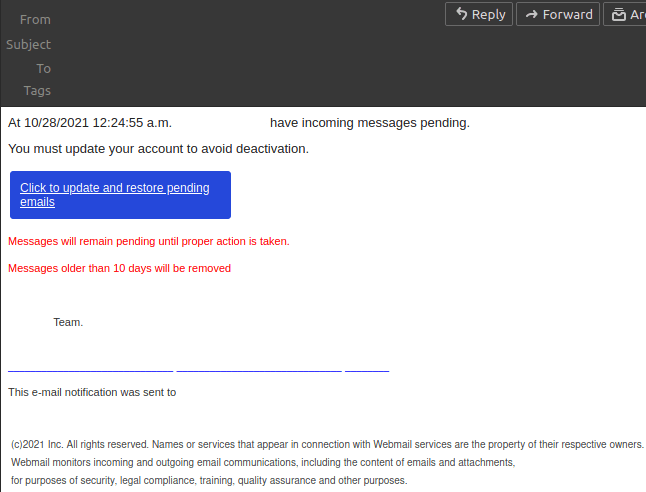
We have intercepted phishing messages claiming to be from cPanel, telling recipients that their disk space is critically low and that they must act immediately. At Unlimited, we do not apply disk quotas and will never contact you in this way.
These emails direct you to click a link leading to a cloned website, where you are prompted to enter your login credentials. The emails are not sent from our domain. If you receive a message like this and are unsure whether it is genuine, contact our support team before clicking anything.
Campaigns like this are not targeted at specific individuals. They are sent to generic addresses such as info@yourdomain.tld in bulk. The only URL that will ever be used alongside your Unlimited login credentials is:
https://www.unlimitedwebhosting.co.uk/client/login
Spotting fake URLs
Even when you are being careful, some attacks are designed to fool a quick glance. In targeted attacks, fake websites are sometimes set up using a homographic attack, where the URL looks identical to a legitimate address but contains substitute characters.
For example, these two URLs are designed to resemble ours but would lead to malicious websites:
https://unlimitedwebh໐sting.co.uk/client/login
https://⋃nlimitedwebhosting.co.uk/client/login
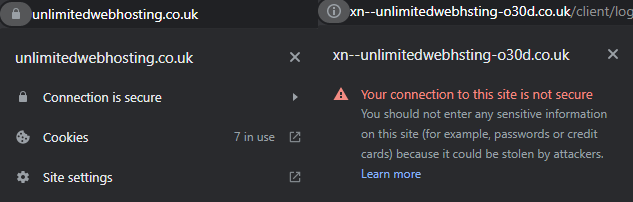
Nominet, which controls .uk domains including .co.uk, .org.uk and .gov.uk, has restricted which substitute characters can appear in domain names, which limits this type of attack for UK-registered domains. Always check the full URL in your browser’s address bar before entering any credentials.
Spear phishing: targeted attacks
Spear phishing attacks are a more targeted form of the attack. Rather than sending generic messages in bulk, attackers use publicly available information to tailor emails to a specific person or organisation. This makes the message harder to dismiss as obvious spam.
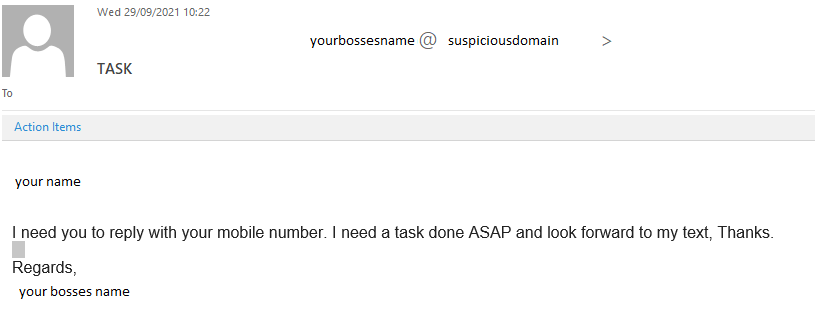
The example above shows how a spear phishing email can evade detection by containing very little content while still creating pressure to respond. By prompting the victim to reply from their personal device, the attacker bypasses workplace security measures entirely. There are many variations on this approach, but the underlying tactic is the same: use just enough personalisation to appear credible.
What to do if you are targeted
Phishing happens in stages. The first is the message itself. If you receive a suspicious email or attachment through our service, report it to us. You can also report phishing emails directly to the NCSC.
Do not click a malicious link in suspicious messages, open an unexpected malicious file, or enter any personal information on fraudulent sites you reached through an unsolicited email. Attackers routinely hide malicious URLs behind friendly-looking text, and malicious sites are built to look identical to the real thing. If you have already clicked a link or downloaded an attachment, act quickly. Secure any affected devices and accounts with privileged access, and consider contacting an information security professional to check for malware.
If you have entered financial details into a malicious site or lost money to a phishing scam, report it to Action Fraud as soon as possible.
Phishing attacks are not going away, and the techniques used are becoming harder to detect. Staying informed, keeping software current and treating unexpected requests for credentials with suspicion are the most reliable defences available.
If you are looking for hosting with security built into the infrastructure, take a look at our secure hosting options.
If you receive a suspicious message that appears to come from Unlimited, or you are unsure whether a communication is genuine, get in touch with our team before taking any action.


