
Have you ever clicked on a website that’s slow? Sometimes waiting several seconds for content to load with annoying delays navigating between different site pages makes using the site frustrating, ruining the whole user experience. A slow website can cost you visitors, ranking and, sales, so it’s a priority to get it right.
What WordPress Cache Plugin do I need?
Caching is easy, effective and the most time efficient way to speed up existing WordPress sites without increasing compute and other resources. Whether you are new to WordPress or a die hard fan it’s likely you have come across some well known popular caching plugins including:
- WP Rocket
- W3 Total Cache
- WP Super Cache
- WP Fastest Cache
- Hummingbird
- NitroPack
Most of these are either freemium or paid for plugins that add more cost to your existing WordPress Hosting. Our Managed WordPress plans come with AccelerateWP as standard so you can cache at the click of a button with support for Redis Object Caching and external CDNs.
What is caching and why is it important for your website speed?
Caching is the process of storing frequently accessed data in a way that allows it to be quickly retrieved without needing to regenerate it every time someone visits your site. Essentially, it creates a copy of the most popular dynamic content in a cache that is optimised for high demand, reducing server load and improving performance.
This is especially important for WordPress websites. WordPress content is stored in a MySQL database, which needs to be queried every time a user requests a page. Similarly, scripts (JavaScript, CSS) and images require additional requests and processing. Without caching, these repeated queries and requests can slow down the site and increase server resource usage.
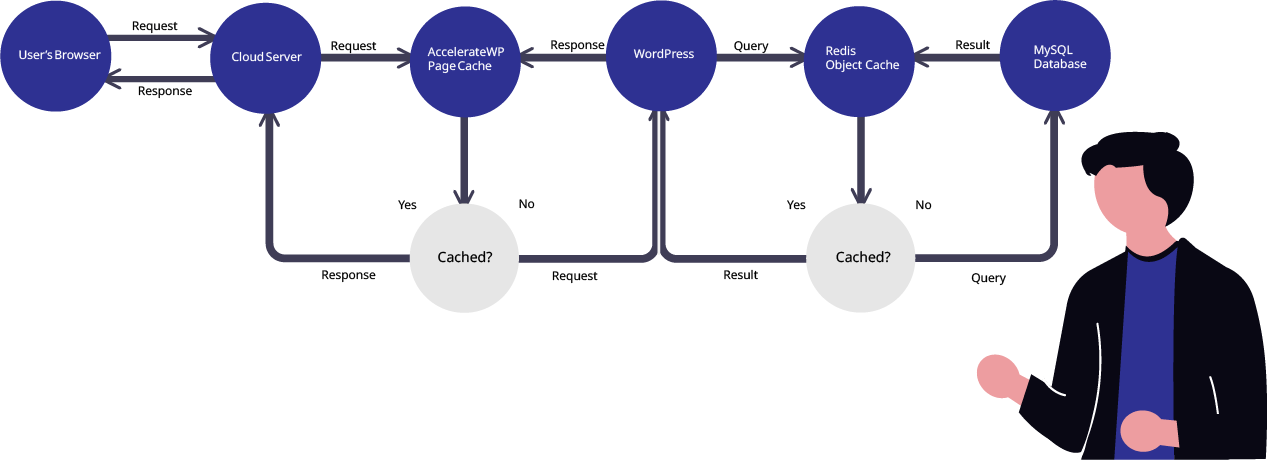
A caching system identifies these performance “blockers” and generates static copies of frequently requested content. This means that when a visitor requests the same content again, the cache delivers the preloaded version without needing to query the database or execute PHP, significantly improving load times.
There are various types of caching systems available, including Nginx reverse proxy caching, which stores full-page responses at the server level which alongside the AccelerateWP WordPress plugin provides built-in caching and additional optimisation features to further enhance WordPress performance.
The Benefits of a WordPress Caching Plugin
Caching and other benefits provided in a WordPress cache plugin are not just about making your site faster. Maximise your websites performance, improve user experience and even improve SEO with the following:
- Faster Load Times: As we’ve already discussed caching static content means its can be delivered faster than dynamic content, meaning visitors don’t have to wait around for it to load.
- Improved User Experience: It might seem obvious but a faster website means a better experience for your visitors, making them more likely to stick around, engage and return.
- Better SEO: It’s well known that page load times are important for ranking. Faster sites rank higher in search results: core web vitals, a better user experience and easy to access information are paramount when trying to boost SEO.
- Reduced Server Load: By serving cached pages your server doesn’t have to work as hard to generate pages for each visitor, saving resources and improving scalability for your website.
The Hidden Costs of Poorly Managed WordPress Caching Plugins
Caching plugins are an essential tool in the WordPress ecosystem, boosting site efficiency when properly managed. However, the reverse can also be true a poorly handled caching plugin can waste disk space, slow down performance, and create long-term maintenance issues.
If you’re on shared web hosting, you already have access to multiple server-level caching systems that are designed to work together. These optimise your site’s speed while ensuring platform stability for all users. By adding extra caching plugins on top of these can lead to duplicate caches, excessive file generation, and outdated data build up. Bloating storage, causing sluggish load times and unpredictable site behaviour.
Caching types explained
There are several types of caching available to optimise your WordPress site. Here’s a breakdown of the most common types and when to use them:
- Page Caching: Stores the entire HTML of a page as cached files and serves it as a static file to visitors. Best for pages that don’t change often, like blog posts or landing pages.
- Object Caching: Stores dynamic data (like product descriptions or customer reviews) to avoid fetching it from the database every time. Useful for high traffic sites with frequently accessed content.
- Browser Caching: Visitors’ browsers to store static resources like images, CSS and JS files locally. Now they won’t need to re-download these resources every time they visit.
- Server-Level Caching: Managed at the server, server-level caching is the fastest and most efficient. We offer server-level caching via Nginx reverse proxy caching and via WordPress specific tools in AccelerateWP.
So Why Use AccelerateWP?
As mentioned earlier, there are numerous WordPress caching plugins available, including WP Rocket, W3 Total Cache, and WP Super Cache, to name a few. These plugins help improve site speed by reducing the need for repeated database queries and PHP execution.
Using a WordPress caching plugin can significantly decrease overall server load and enhance user experience by serving cached versions of web pages much faster. This not only improves page load times but also helps optimise website performance, especially during high-traffic periods.
But at what cost? As an example WP Rocket is a great choice for a WordPress cache plugin but it can add significant cost, especially now that the lifetime license has been discontinued.
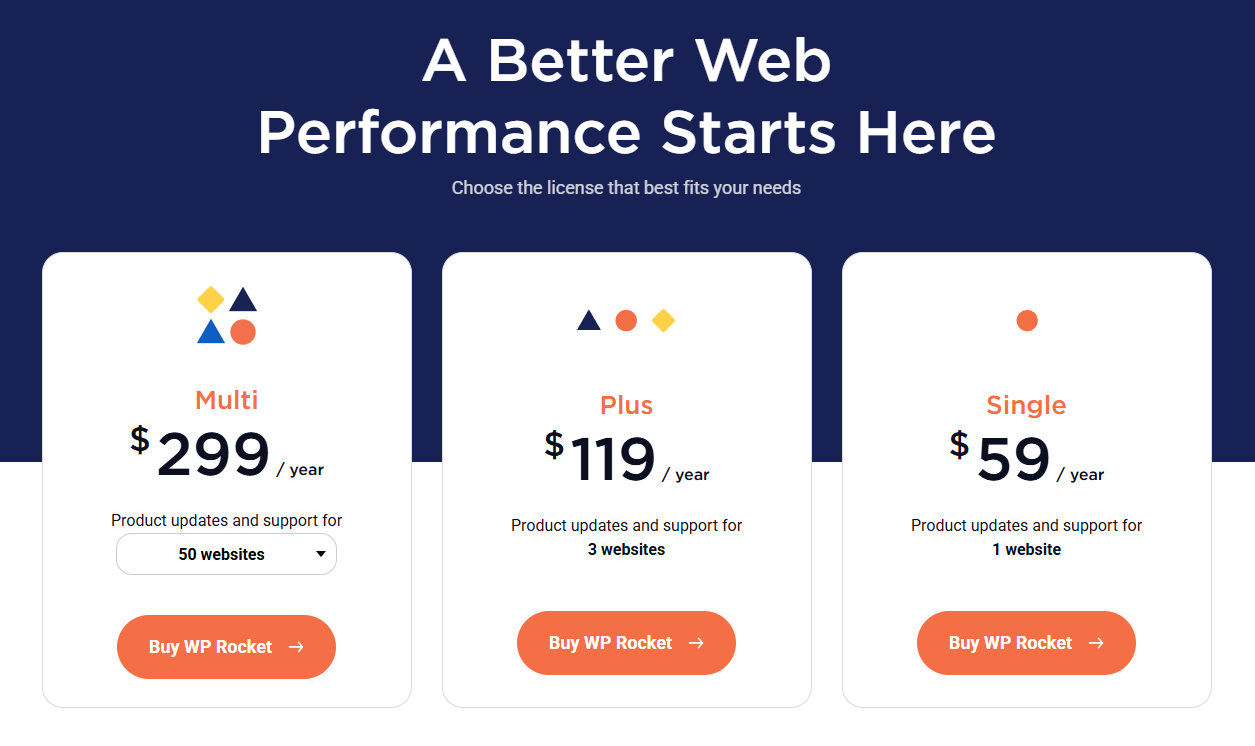
Free plugins like WP Super Cache may lack certain features found in other caching plugins, such as CSS and JavaScript minification or lazy loading for images.
Big Advantages of AccelerateWP
As we now know many WordPress users rely on external plugins to enable caching, but these often come with extra costs and further increase the complexity of your WordPress installation. Caching is built into your hosting environment, so it’s seamless and hassle-free, enabled at the click of a button and manageable from your WordPress dashboard.
Here’s why AccelerateWP’s caching stands out:
- No Extra Cost: Unlike third-party plugins, you don’t have to pay extra annual subscriptions or licenses, it’s all included with your hosting.
- Integrated Performance: AccelerateWP’s caching comes fully integrated with your hosting, making it faster and more efficient.
- Simplicity: Forget about external plugins, updates and configuration settings. AccelerateWP makes caching simple and effective, so you can focus on your website’s content.
Some examples of caching in AccelerateWP:
- Static HTML files.
- Browser caching.
- User specific content cache.
- Mobile cache support.
- Redis Object caching.
- Pre-caching.
When Not to Use Caching & Object Caching
Caching is a powerful tool but there are situations when it should be avoided. This is especially true on pages that have dynamic user-specific content; a checkout page is a poor candidate for caching and object caching as it could reveal details of another user that have been held in the cache. This has the potential to create a significant security and privacy risk.
We talked earlier about some potential disadvantages of caching specifically using multiple plugins together. This is quite common and will often cause conflict issues and other unexpected behaviour. To avoid this, it’s best to stick with a single, reliable caching solution.
Get Started with WordPress Caching Today!

About Angus
Angus is the Website and Content Developer at Unlimited Web Hosting UK where he crafts clear, engaging content optimised for humans.

You May Also Like
Related articles you might find interesting.
Unlimited Web Hosting Has Been Nominated for Monster’s Award 2022!

Running a WordPress site?
Get fast, secure and reliable WordPress Hosting with optimised for performance with AccelerateWP.
Get WordPress Hosting
Need multiple accounts?
Create fully isolated individual accounts for your clients and manage them all from one dashboard.
Get Reseller Hosting